Home Server Ops with a Read-Only Agent and pyinfra

How I manage my home server with a coding agent: it gets read-only SSH access to explore, and every change goes through pyinfra deploys in a git repo that I review and apply.
My home server is a small mini PC running Debian. It holds the file shares, Time Machine backups, Gitea, a music server and a few small apps of my own. Like most home servers it grew by hand over the years: a command here, a config edit there, notes somewhere else. Its exact state was mostly in my head, and not reliably.
Over two days I moved it to a setup where a coding agent does most of the work, but can't change the server on its own. This setup has proven to be extremely reliable and helpful: the server now has a declarative state, and I can review every change the agent proposes before it is applied.
The idea
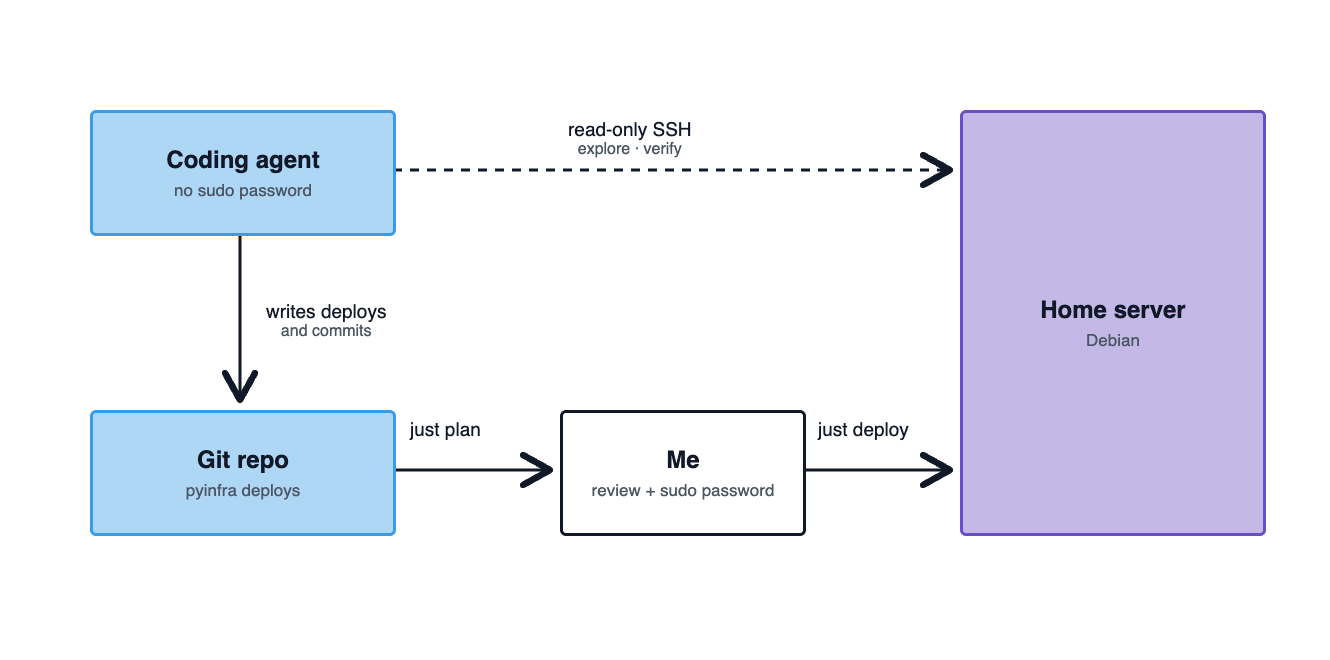
The setup is built on two rules:
- The agent gets read-only access. It can SSH into the server as my normal
user and look at everything: systemd units, logs, disk usage, config files,
cron jobs.
sudorequires a password, which the agent doesn't have. So in practice it can explore, but not change anything. - Every change is code. The agent never runs ad-hoc commands to fix something. It writes or changes a pyinfra deploy in a git repo. pyinfra is "Ansible in Python": you describe the desired state with Python operations, it compares that state with the server and only applies the difference.
The sudo password is the boundary between the two. I run the dry run and the real deploy in my own terminal, see the diff and type the password. No special user, no extra tooling.
The repo
miniserver/
├── CLAUDE.md        # rules for the agent
├── SERVER.md        # current state of the server, written by the agent
├── inventory.py     # the server, resolved via ~/.ssh/config
├── justfile         # plan, deploy, ping, fact, ...
├── deploys/         # one pyinfra deploy per topic
│   ├── base.py      # packages, time sync, unattended-upgrades
│   ├── backup.py
│   ├── proxy.py
│   ├── ...
│   └── all.py       # includes everything in order
└── files/           # scripts and systemd units deployed to the server
CLAUDE.md holds the rules the agent follows in every session. The important
part is short:
- Read-only exploration is fine: ssh in and run commands that only read state.
- Never modify the server without explicit permission.
- Prefer pyinfra over ad-hoc commands for changes. Always do a dry run first
  (`just plan [deploys/<file>.py]`) and review the plan before the real run.
- `files/` holds the scripts/units deployed to the server; edit them here,
  never directly on the server.
SERVER.md is the inventory the agent wrote in the first session by exploring
the server: OS, hardware, disks, users, services, backups. It gets updated at
the end of every session, so the next session starts from a description instead
of from scratch.
A deploy
A deploy is plain Python. This one manages a single setting in Gitea's
app.ini, restarts Gitea only if the setting changed, and checks the result:
from pyinfra.operations import files, server, systemd

APP_INI = "/home/git/gitea/custom/conf/app.ini"
ROOT_URL = "http://gitea.local/"

root_url = files.line(
    name=f"app.ini: ROOT_URL = {ROOT_URL}",
    path=APP_INI,
    line=r"^ROOT_URL *=.*$",
    replace=f"ROOT_URL = {ROOT_URL}",
    _sudo=True,
)

systemd.service(
    name="Restart gitea after config change",
    service="gitea",
    restarted=True,
    _if=root_url.did_change,
    _sudo=True,
)

server.shell(
    name="Verify Gitea",
    commands=["systemctl is-active gitea"],
    _sudo=True,
)
Deploys are idempotent: running them again changes nothing. That makes it safe
to run all.py at any time to check whether the server still matches the repo.
The workflow
A typical change looks like this:
- I describe what I want, e.g. "every app should get a name like
gitea.localinstead of a port". - The agent explores the server read-only, writes the deploy (here: Caddy as reverse proxy plus mDNS aliases) and tells me what will change.
- I run
just plan deploys/proxy.py, a pyinfra dry run with diff, and review it. - I run
just deploy deploys/proxy.py. - The agent verifies the result over SSH, updates
SERVER.mdand commits.
The agent does the tedious parts (reading man pages, finding config locations, writing systemd units, checking logs), while I keep control over what actually changes. And the git history doubles as an operations log.
What came out of it
In two days the repo grew to about 40 commits: a full system upgrade, the printer moved over from an old Raspberry Pi, Time Machine backups for the Macs, push notifications for failed jobs, a reverse proxy with local names for all apps, and two of my own Python apps deployed as pinned releases.
Mistakes still happened, but they ended up in CLAUDE.md as lessons learned
for the next session. A few examples:
apt autoremoveafter the upgrade removed about 250 packages, includingsmartmontools. pyinfra's dry run can't show what apt will remove, so now the rule is to checkapt-get -s autoremovefirst.- A backup of an unmounted mount point "succeeds" with an empty snapshot. The backup script now refuses an empty source or a missing destination.
OnFailure=on a unit withRestart=alwaysfires on every restart, which means a flood of notifications.
One caveat: read-only doesn't mean the agent sees nothing sensitive. It can read everything my user can read. For a home server I'm fine with that, but it's worth keeping in mind before you do the same with a machine that holds other people's data.